Hosting a visiting clan
You host the board; they field the roster. This is the path that avoids collecting a dozen RSNs in a DM — one link per team, and a seat that lets their own moderator run their half of the event.
What you’re setting up
A clan-v-clan is an ordinary event with one difference: half the players aren’t in your clan and never will be. They can’t be roster-synced in, you don’t want to promote them, and you certainly don’t want to sign twenty of them up by hand and then drag each one onto the right team.
Two pieces solve that, and they’re independent — use either, or both.
It is not a login and not a shortcut past verification. Whoever opens it still signs in with Discord and still needs a verified RSN, exactly like any other sign-up. The only things the link decides are which team the sign-up joins and that it needs nobody’s approval.
Make the team first
Open your event and go to the Teams & Draft tab. Create one team per clan you’ve invited and name it after them — the name is what their players see on the sign-up form, so “Ironforge” beats “Team 2”.
You do not need to run a draft. Invite links and a draft are alternatives: a draft distributes a shared sign-up pool, a link seats people directly. On a pure clan-v-clan most hosts create the teams, hand out one link each, and never open the draft at all.
Then open the team itself — Teams & Draft → the team — which is where both of the next two steps live.
Name the visiting side’s captain before you hand out the link, so the team page has an owner from the start. Naming a captain also seats them on the team; if the card warns you they aren’t on the roster, take the fix it offers.
Hand their moderator a seat
The Team staff panel on the team page is how the visiting clan’s own moderator gets to work without you granting them anything on your site. Press Add someone, search for them, add a note like “Ironforge’s mod” so the next admin knows why they’re there, and press Give a seat.
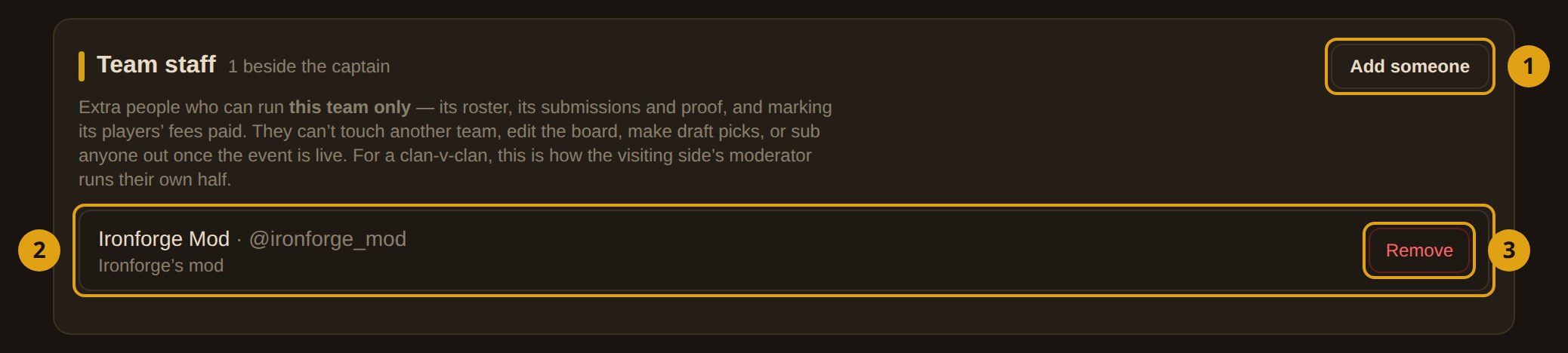
- 1Add someone — opens the search. Only people who have signed in here with Discord at least once can appear — see the note below.
- 2The note — free text, 120 characters. Write which clan they are from. Seats outlive the event in the list, and “who is this person” is the question you will have in three months.
- 3Remove — takes the seat back immediately. Do this when the event ends — a seat is not automatically time-limited.
What a seat can do, on that team only:
- see and manage the team’s roster
- handle its submissions and proof
- mark its players’ fees paid
- mint invite links for it, if you turn that on (next step but one)
What it can never do:
- touch any other team
- edit the board or its tiles
- make draft picks
- sub anyone out once the event is live
The search only lists accounts with a linked Discord — a seat is attached to a person who can actually log in. So send the visiting moderator to this site, have them press Login once, and then grant the seat. If they don’t appear in the search, that login hasn’t happened yet.
Mint the invite link
Still on the team page, the Invite links panel makes the link. Two fields decide what the link promises, and both take 0 to mean “don’t promise anything”.
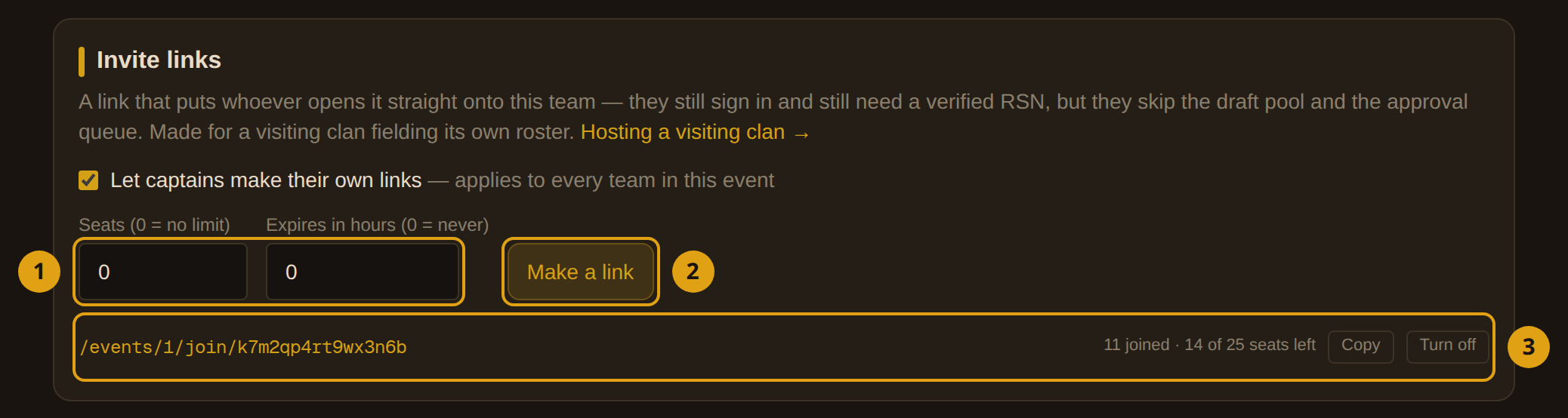
- 1Seats and expiry — how many people the link may seat (up to 100) and how long it stays good for (up to 30 days). Set the seats to the roster size they promised you and the link closes itself when they’re all in; set an expiry when the link is going into a public Discord.
0in either field means no limit. - 2Make a link — mints it and copies it to your clipboard straight away. Paste it to them before you do anything else.
- 3The live list — every link this team has out, with how many have joined and how many seats are left. Copy grabs it again; Turn off kills it for good.
The link looks like https://beta.anvilosrs.com/events/12/join/k7m2qp4rt9wx3n6b — one line, safe to paste into a Discord message.
For a clan-v-clan where you’ve agreed a roster with one moderator, leave both fields at 0 and let them run it. Reach for seats and expiry when the link is going somewhere you don’t control.
Turning a link off is instant and does not remove anyone who already joined — they are ordinary players on that team now. To take someone off, use the team’s roster.
Let them mint their own links
By default only a host can make links, and a captain who tries is told so. That default is right for a normal clan event — a captain handing out seats would be filling a roster nobody approved — and wrong for a clan-v-clan, where the visiting side knows its own roster better than you do.
The switch is on the same Invite links panel: Let captains make their own links. It applies to every team in this event, not just the one you’re looking at, which is what you want when both sides are visiting clans.
With it on, the team’s captain and anyone holding a staff seat can mint links themselves from My Team → Invite links. They get the same panel you do, minus the switch.
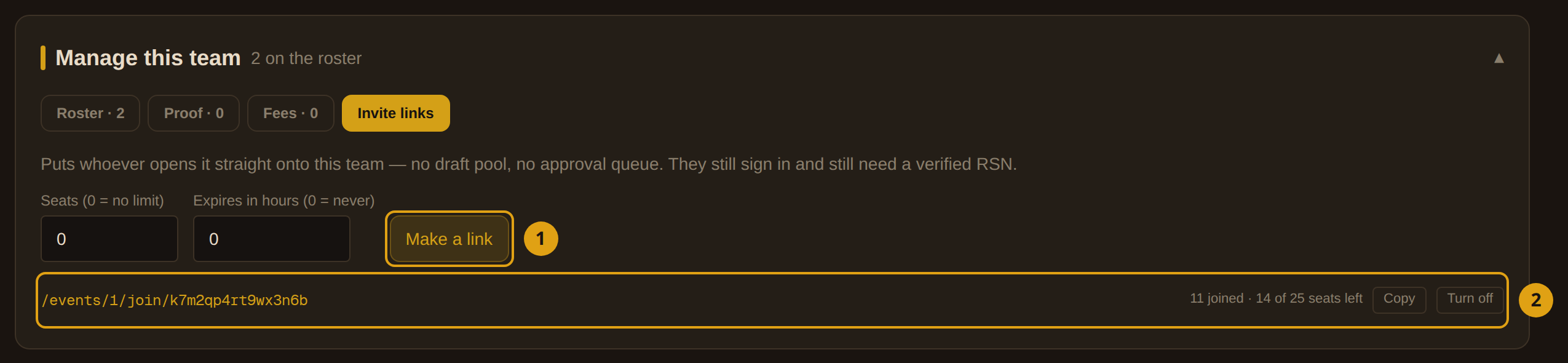
- 1Same panel, captain’s view — mint, copy, turn off. If the host hasn’t turned the switch on, this reads “Only a host can make links for this event” and the fields are gone.
- 2The live list — a captain who can’t mint still sees the links their team has out — so they can ask you for another instead of assuming none exist.
What their players see
Worth walking once yourself before you hand the link out, so you can answer questions about it.
- They open the link. If they’re not signed in, they sign in with Discord first and come straight back — the link isn’t lost on the way.
- They land on the ordinary sign-up form, with a banner reading You’re joining Ironforge by invite. Same questions, same account picker, same fee as anyone else.
- On submit they are on that team, approved. No host action, no draft.
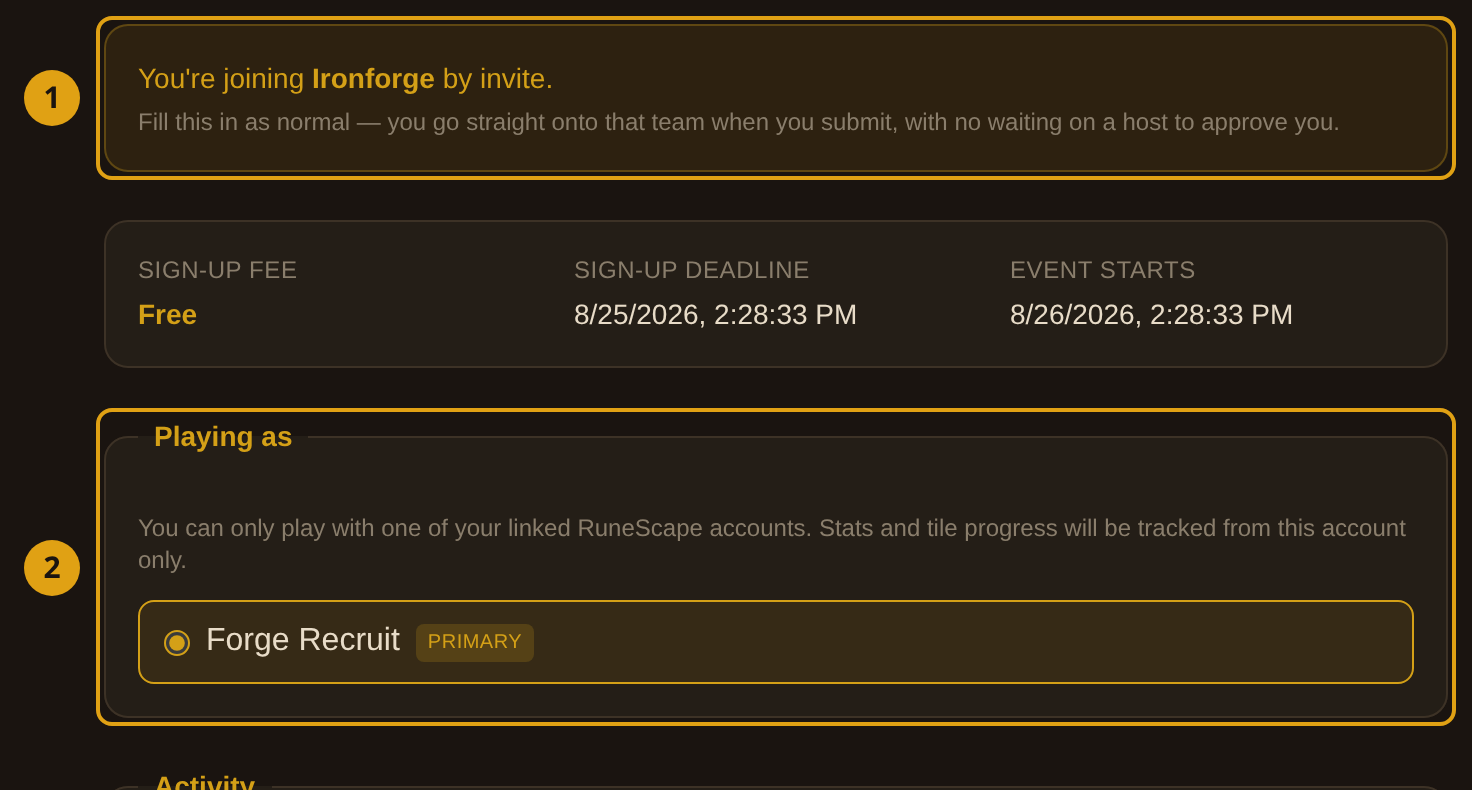
- 1The invite banner — names the team they are about to join. If it names the wrong team, they have the wrong link — stop and check before submitting.
- 2The rest of the form — unchanged. A verified RSN is still required, sign-up questions are still asked, and a sign-up fee still applies.
If someone signed up normally first and is sitting in the pool, opening the link moves them onto the team instead of creating a second entry. Someone already approved onto another team is left alone — move them from the roster instead.
When a link stops working
A refused link explains itself on the page rather than 404ing, so the person holding it can tell you which of these it is.
0 hours this time if the expiry isn’t earning its keep.Before the event, walk this list once per visiting clan:
- their team exists and is named after them
- their captain is named and seated
- their moderator has signed in here and holds a staff seat
- the link is minted, copied, and actually delivered to a human
- the sign-up window is open for as long as they need it
Turn the links off and remove the staff seats. Neither expires on its own, and a live link on a finished event is just a loose end.
Screenshots are from a live setup on a test board — invite tokens and Discord names are blanked out. A real link is worth guarding: anyone holding it can take a seat on that team while it is live.